From Postman collections
A Postman collection becomes one REST API in the project you choose:
- folders become folders;
- requests become requests;
{{variables}}become Wirebench properties.
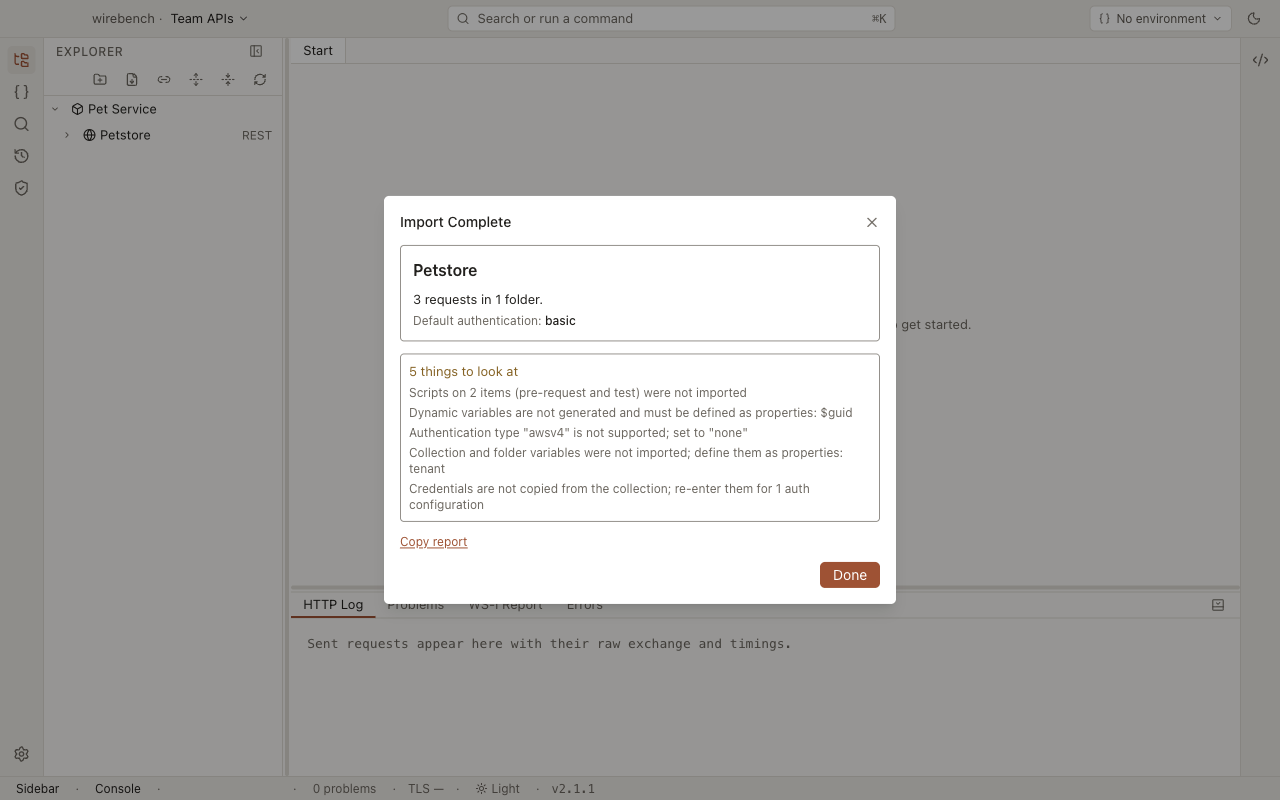
Collection variables come across as project properties, and environment and globals exports have their own import. Credentials do not come across. Pre-request and test scripts do, switched off until someone has read them. The import summary lists each of these, so you know what to set up before the first send.
To run the import, see Postman collections in the importers guide. It takes Collection v2.0 and v2.1 JSON, from a file or pasted.
What carries over
Section titled “What carries over”| In Postman | In Wirebench | More |
|---|---|---|
| The collection, its name and description | A REST API with the same name and description | REST |
A baseUrl or base_url collection variable. Without one, the origin of the first full URL |
The API’s Base URL, also offered as a suggestion in that field. Request URLs that started with {{baseUrl}} become relative paths |
REST |
| Folders, nested, with their descriptions | Folders, nested the same way | |
| Requests: method, URL and description | Requests. A request saved as a bare URL string is a GET | |
{{name}} anywhere in a name, URL, header, query, body or auth field |
${name}. It looks the name up in the active environment first, then the project, the workspace and global properties |
Property syntax |
| Collection and folder variables, other than the base URL | Project properties. A secret-typed variable becomes a secret in the secret store. A name the project already has keeps its value; the summary lists it | Environments and properties |
| Environment and globals exports | Import… → Postman environment / Postman globals. An environment becomes a workspace environment (renamed when the name is taken, never made active); globals merge into Globals; secret-typed values go to the secret store | Importers |
:id path segments and their values |
{id} in the URL, with a row in the Path parameters table |
Path and query parameters |
| Query parameters and headers, including disabled ones | Rows in the Params and Headers tables. Disabled rows stay off | |
| A raw body (JSON, XML, text…) | A raw body in the same language | Request body |
An x-www-form-urlencoded body |
A form body | |
A form-data body |
A multipart body. File fields keep the file path | |
| A binary file body | A binary body pointing at the same path | |
| A GraphQL body | A raw JSON body holding query and variables, with Content-Type: application/json |
Authentication
Section titled “Authentication”Auth set on the collection becomes the API’s auth. Auth on a folder becomes the folder’s, and auth on a request becomes the request’s. A request or folder set to inherit still inherits.
| Postman auth | Wirebench auth |
|---|---|
| No auth | None |
| Inherit auth from parent | Inherit |
| Basic | Basic, with the username |
| Bearer token | Bearer. The token is not copied |
| API key | API key, with its name and whether it goes in a header or the query. The key is not copied |
| OAuth 2.0, authorization code (with or without PKCE) | OAuth 2, authorization code with PKCE on: token URL, authorization URL, client ID and scopes |
| OAuth 2.0, client credentials | OAuth 2, client credentials: token URL, client ID and scopes |
| NTLM | NTLM, with the username, domain and workstation |
See Authentication for each scheme’s fields.
What does not carry over
Section titled “What does not carry over”| In Postman | What happens | What to do |
|---|---|---|
| Passwords, tokens, API key values, client secrets | Never copied. The summary counts the auth configurations that need one | Enter each on its Auth tab. Wirebench stores it encrypted outside the project |
Dynamic variables such as {{$guid}} or {{$timestamp}} |
Kept as written, and nothing generates a value. One warning in the summary names them all | Replace each with a property, or with a value a script sets |
| Pre-request and test scripts | Imported as each request’s scripts: the collection’s, the folders’ and the request’s own, in order, run through a pm layer. Switched off until switched on. The summary counts them and names the requests that call something the layer does not support |
Read them, then Switch on (per request) or Switch on scripts… (for an API or folder). Rewrite a call the layer does not support, such as pm.sendRequest; a value one request passes to another can also be a sequence transfer |
| OAuth 2.0 password or implicit grants | Auth set to none. The summary names the grant | Pick a supported grant on the Auth tab, or set the token as Bearer |
| Other auth types (Digest, AWS Signature, Hawk, OAuth 1.0, Akamai, JWT…) | Auth set to none. The summary names the type | Set the request’s auth by hand, or send the header yourself |
| Items that are neither a folder nor a request | Skipped. The summary counts them | Nothing: there was no request to import |
| Saved responses and examples | Not imported, and not reported | Send the request to get a live response |
| Collections by URL | Not supported | Download the file, or paste its JSON |
After importing
Section titled “After importing”-
Read the summary, or choose Copy report to keep it as a checklist.
-
Enter the passwords, tokens and keys it counts, on each Auth tab. See Secrets.
-
Import the collection’s environments and globals with Import… → Postman environment or Postman globals. Then only the names the summary still lists need defining, as properties or environment variables. See Environments and properties.
-
Check the API’s Base URL, then send one request to confirm the setup.
Related
Section titled “Related”- Importing APIs: the Import dialog and every format it reads.
- Property expansion syntax: how
${name}resolves. - Secrets: where credentials live and why no import copies them.