From OpenAPI and Swagger
An OpenAPI or Swagger document becomes one REST API in the project you choose. Every operation becomes a ready-to-send request, filled in with examples from the document:
- tags become folders;
- servers become base URLs;
- security schemes become auth you can apply with one click.
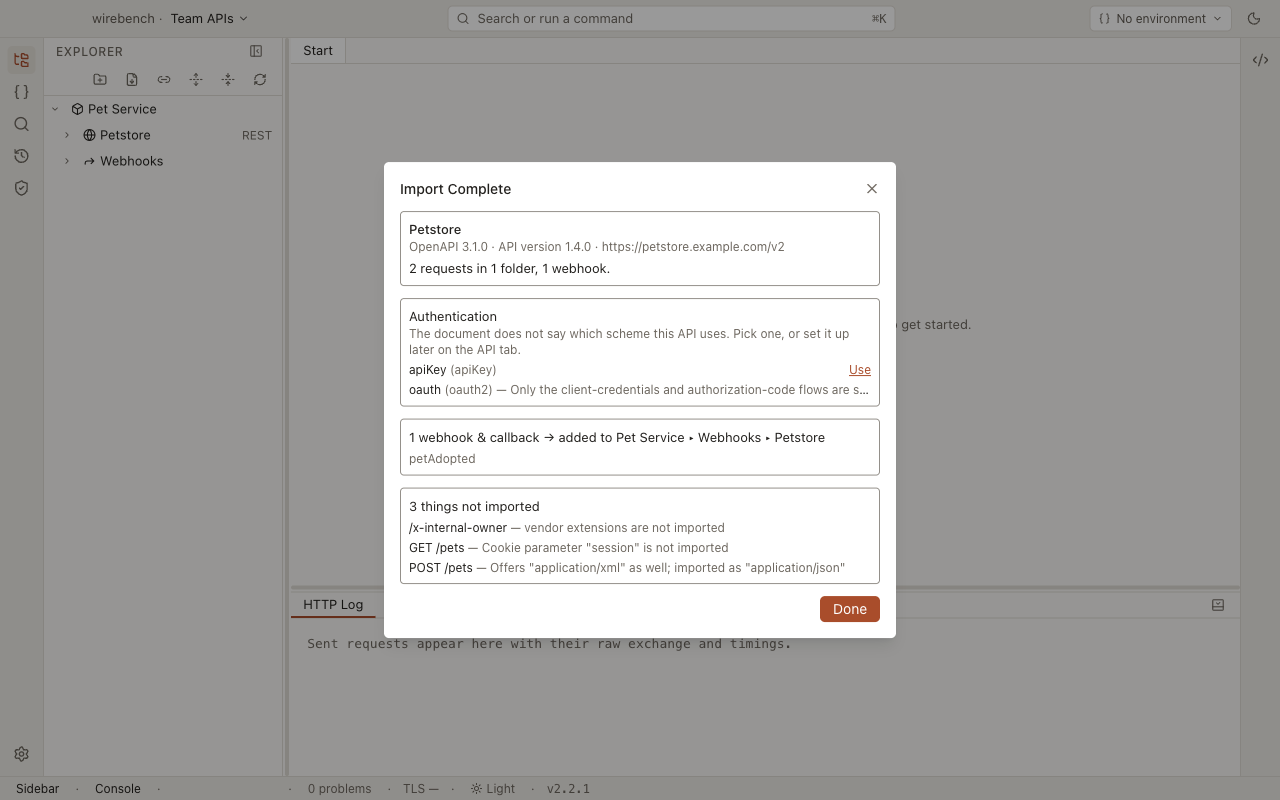
Webhooks and callbacks come across too, as webhook items in the project’s Webhooks collection. Responses, links and vendor extensions do not. The summary lists what was skipped and why.
To run the import, see OpenAPI (and Swagger) in the importers guide. It reads OpenAPI 3.0, 3.1 and 3.2, and Swagger 1.x and 2.0, in YAML or JSON, by URL, file or paste.
What carries over
Section titled “What carries over”| In the document | In Wirebench | More |
|---|---|---|
info.title and info.description |
The API’s name and description | REST |
servers, with variables filled from their defaults |
The API’s Base URL (the first server). The others are offered as suggestions in that field | Create an API |
Swagger 2 host, basePath and schemes |
The same, built into server URLs. With no scheme, https |
|
| An operation’s first tag | A folder, with the tag’s description. An untagged operation goes in a Deprecated folder if it is deprecated, else in one named after the first path segment | |
| An operation | A request named after its summary, else its operationId, else METHOD /path. A deprecated operation’s description starts with Deprecated. |
|
| Path parameters | Rows in the Path parameters table, turned on | Path and query parameters |
| Query parameters | Rows in the Params table. Required ones are on; optional ones are there but off | |
| Header parameters | Rows in the Headers table, all off, so the import never changes what is sent until you turn one on | |
| Parameter examples | Values: the example, else the first named example, else a value made from the schema |
|
| A request body | One body, chosen in this order: JSON, XML, form, multipart, anything else. Required fields are on | Request body |
Swagger 2 body and formData parameters |
A raw body, or a form or multipart body | |
Global security with a single requirement |
The API’s auth, applied for you | Authentication |
An operation whose security differs from the global one |
That request’s own auth. security: [] becomes None |
Security schemes
Section titled “Security schemes”The summary lists the schemes, each with a Use button, when the global security lists more
than one requirement or none at all; you choose one. Either way, the document holds no credential to
import, so you fill it in on the API tab.
| Scheme | Wirebench auth |
|---|---|
HTTP basic |
Basic |
HTTP bearer |
Bearer |
apiKey in a header or the query |
API key, with its name and location |
oauth2 with a client-credentials flow |
OAuth 2, client credentials: token URL and scopes |
oauth2 with an authorization-code flow |
OAuth 2, authorization code with PKCE on: authorization URL, token URL and scopes |
When a scheme offers both OAuth 2 flows, the import uses client credentials. The client ID is left empty for you to fill in.
What does not carry over
Section titled “What does not carry over”| In the document | What happens | What to do |
|---|---|---|
| Credentials of any kind | Nothing to import: a document doesn’t hold them | Fill them in on the API’s Auth tab |
HTTP schemes other than basic and bearer (digest…) |
Listed in the summary with the reason; no Use button | Send the header yourself |
apiKey in a cookie |
Not an Auth setting: each request sent under it gets a switched-off Cookie header with the key’s name and a blank value |
Fill in the value and switch the header on |
OAuth 2 flows that are only implicit or password |
Listed in the summary with the reason | Use a client-credentials or authorization-code setup, or a Bearer token |
openIdConnect and mutualTLS schemes |
Listed in the summary with the reason | For mutual TLS, see Client certificates |
| Cookie parameters | Joined into one switched-off Cookie header per request, like other header parameters |
Switch the header on |
Accept, Content-Type, Authorization and Cookie header parameters |
Skipped, and listed: the request sets these itself | Nothing |
| A second media type for a body | Skipped, and listed with the one that was chosen | Change the body on the Body tab |
webhooks (OpenAPI 3.1+) and operation callbacks |
Imported as webhook items in the project’s Webhooks collection, in a folder named after the API, when Import webhooks & callbacks is ticked (the default) | Point them at your own receiver. See Sending webhooks |
webhooks in an OpenAPI 3.0 document |
Skipped, and listed: webhooks need 3.1 | Nothing |
| Links | Skipped, and listed | Nothing |
Vendor extensions (x-…) |
Skipped, and listed | Nothing |
A $ref that can’t be resolved |
Skipped, and listed | Fix the reference in the document and import again |
| Responses and response examples | Not imported, and not listed | Send the request to see the live response |
| Servers set on a single path or operation | Not imported, and not listed | Set the request’s URL to the full address, or use an environment |
| Server variables with a list of allowed values | Filled from their default only. The import makes no environments from the list | Add an environment per value |
| Tags after an operation’s first | Not used: a request lives in one folder | Nothing |
After importing
Section titled “After importing”-
Read things not imported in the summary.
-
If the import didn’t apply a security scheme, choose Use on the one the API uses. Then fill in its credentials on the API tab. See Secrets.
-
Turn on the header and optional query rows you need, on each request.
-
Send one request to confirm the base URL and auth.
Related
Section titled “Related”- Importing APIs: the Import dialog and every format it reads.
- REST: working with the imported requests.
- Authentication: each scheme’s fields.