From a legacy SOAP project
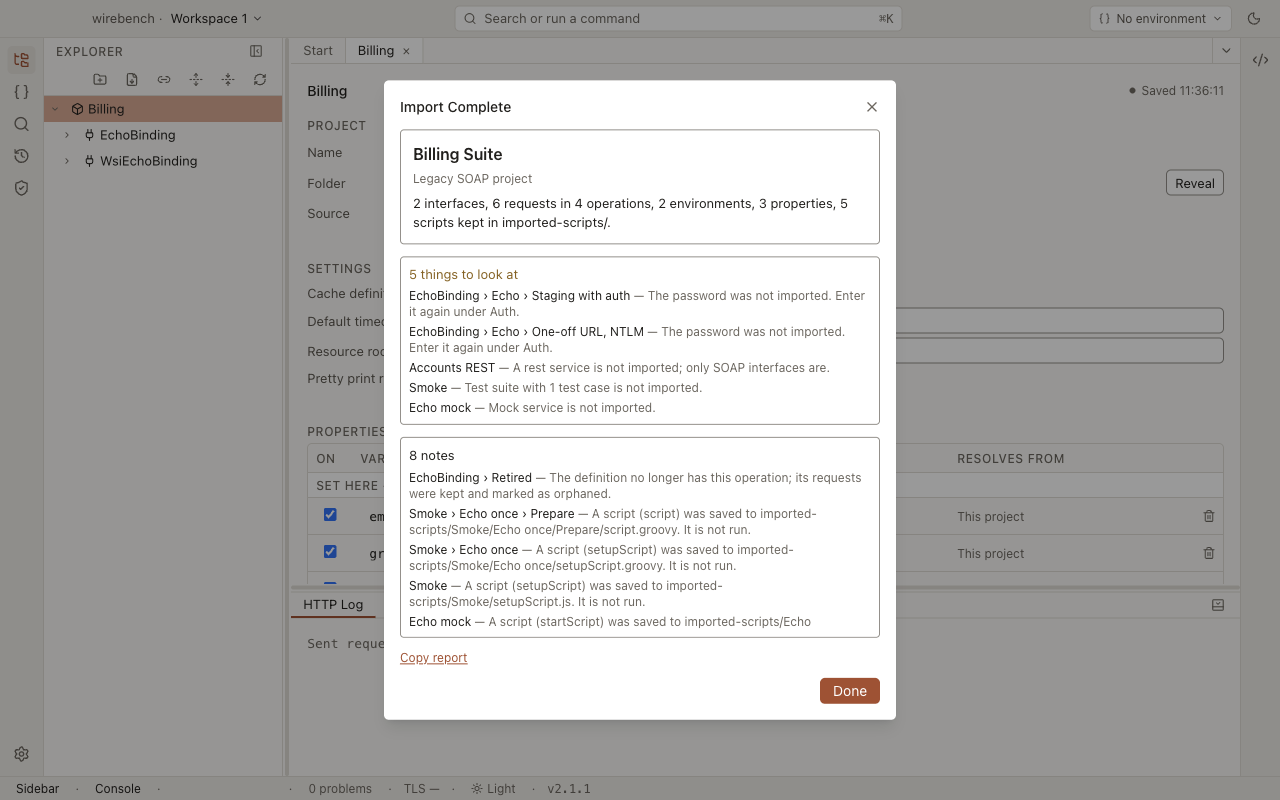
A legacy SOAP project file is the single XML file in which an older desktop SOAP workbench saves a project. Importing it adds four things to a Wirebench project:
- the file’s SOAP interfaces;
- its saved requests;
- its properties;
- its environments.
Credentials, assertions, test suites and mocks do not come across. The report lists every one of them against the request or interface it belonged to.
To run the import, see Legacy SOAP project in the importers guide. It reads the file from disk only; a pasted copy is refused.
What carries over
Section titled “What carries over”| In the project file | In Wirebench | More |
|---|---|---|
| A SOAP interface | An interface, built from the WSDL copy the file carries. Without a copy, the WSDL is fetched over HTTP(S) and the report notes it | SOAP and WSDL |
| The interface’s endpoints | The interface’s endpoints | |
| Operations | Operations, in the definition’s order | |
| A saved request | A request with the envelope exactly as saved, and its SOAP version, SOAPAction and endpoint | Send a request |
| A request’s character encoding and timeout | The request’s encoding and timeoutMs properties |
|
| WS-Addressing turned on for a request | WS-Addressing turned on for that request | |
| A request’s username, with a domain or NTLM set | NTLM auth with the username and domain | Authentication |
| A request’s username otherwise | Basic auth with the username. Preemptive stays preemptive | |
| Project properties | Project properties with the same names and values | Environments and properties |
| Environments, with their properties and endpoint overrides | Environments with the same properties and endpoint overrides | Endpoint overrides |
${#Project#name} where an imported environment defines name |
Rewritten to ${name}, so it follows the active environment |
Property syntax |
${#Project#name}, ${#Global#name}, ${#System#name}, ${#Env#name} otherwise |
Kept as written. These scopes exist in Wirebench too | Property syntax |
| Scripts, on any element | Saved as they are under imported-scripts/ in the project folder, and listed in the report. They are never run |
A request whose operation is no longer in the WSDL is kept, marked as orphaned, and noted in the report.
What does not carry over
Section titled “What does not carry over”| In the project file | What happens | What to do |
|---|---|---|
| A saved password | Not imported. The report lists each request that had one | Enter it in the request’s Auth inspector. Wirebench stores it encrypted outside the project |
| SPNEGO/Kerberos, OAuth 2.0 or OAuth 1.0 auth on a request | Not imported. The report lists the request | Set the request’s auth again |
| OAuth 2.0 and OAuth 1.0 profiles | Not imported. Reported once | Set up OAuth 2 on the endpoint or interface. See OAuth 2 |
| Assertions on a request | Not imported. The report counts them per request | Recreate the checks you need |
| Attachments on a request | Not imported. The report counts them per request | Add the files again. See Attach files |
| A request’s WS-Security configuration, and the project’s WS-Security configurations and keystores | Not imported. Reported by name | Set them up again. See WS-Security |
| Test suites and test cases | Not imported. Reported with the number of test cases | Rebuild the flows you need from the imported requests |
| Mock services | Not imported. Reported | Not available in Wirebench |
| REST and other non-SOAP services | Not imported. Reported | Import the API from its OpenAPI document instead. See From OpenAPI and Swagger |
| Database connections and requirements | Not imported. Reported | Not available in Wirebench |
| Other per-request settings, such as custom HTTP headers | Not read, and not reported | Add them in the request’s Headers inspector |
| A request whose saved body is empty or can’t be decompressed | Skipped. Reported | Recreate it from the operation |
| An interface whose WSDL the file doesn’t hold, at a local path | Not imported, because Wirebench never reads a local path named in the file. Reported | Import that WSDL on its own |
${#TestCase#name}, ${#TestSuite#name} and other scopes Wirebench doesn’t have |
Kept as written, but they resolve to nothing. The import does not report them; sending the request does | Change them to ${name}, and define name as a property |
| An encrypted project file | Refused | Open it in the tool that wrote it, save it without a password, and import that copy |
After importing
Section titled “After importing”-
Read the report, or choose Copy report to keep it as a checklist.
-
Enter the passwords it lists, in each request’s Auth inspector.
-
Check the project and environment properties for credentials, and move any you find to secrets.
-
Switch to one of the imported environments and send one request, to confirm that the endpoint and properties resolve.
Related
Section titled “Related”- Importing APIs: the Import dialog and every format it reads.
- SOAP and WSDL: working with the imported interfaces.
- Environments and properties: scopes and endpoint overrides.