History
History is the persistent record of every request you’ve sent — SOAP, REST and gRPC alike. Unlike the HTTP Log, which is the raw wire exchange for the current session only, History survives a relaunch and is what you reach for to re-run or compare past sends.
Browse and search
Section titled “Browse and search”Open History from the activity bar, or press ⌘⇧Y / Ctrl+Shift+Y. Each row shows when the request was sent, its project (when more than one is open), its method or protocol badge, its name and operation, the endpoint’s host, its status and its duration.
- Type into the search field to filter by request name, operation, interface, endpoint, status, fault reason or tag.
- Use the project dropdown to narrow to one open project, or leave it on All projects.
- Click a row to open it as a read-only tab with the request and response bodies side by side.
Re-send an entry
Section titled “Re-send an entry”Click the ↻ button on a row (or Re-send on an open entry’s tab) to send it again. This resends the original request as recorded — it doesn’t reopen the request for editing first. The result appears as a new History entry. SOAP, gRPC and REST entries can be re-sent; a WebSocket session, or a REST request whose response was an event stream, is sent again from its request.
Re-send a gRPC call
Section titled “Re-send a gRPC call”A gRPC call goes out through the request it came from, as that request is now: its target under the active environment, TLS, metadata and credentials. The method and the request messages come from the entry, so the same messages are sent even if the request’s message text has changed since.
- A unary or server-streaming call sends its one message. A server stream runs until the server closes it.
- A client-streaming or bidirectional call sends every message it recorded — including the ones pushed while the call was open — in their original order, then closes its side. The replay doesn’t keep the original timing: the server receives all the messages at once, before any response.
- If the request the call came from has been deleted, the entry can’t be re-sent: History keeps
neither the TLS identity nor the
.protoset the call needs.
Re-send a REST request
Section titled “Re-send a REST request”A REST entry goes out through the request it came from. The entry supplies what went on the wire: the method, the URL with its query, the headers you typed and the body. The request supplies everything else as it is now: auth, TLS, proxy and send settings under the active environment. The request itself isn’t changed.
- Auth is applied once. History never records auth headers, so the request’s current auth adds them. When the request’s API key travels in the query, the recorded key parameter is dropped and the current key is added in its place.
- Redacted values are filled from the request. History stores secrets as
<redacted>, and in an XML body as<redacted>, escaped so the body stays well formed. A redacted header or query value is replaced by the request’s own value for that header or parameter, as typed (a${secret:token}reference, say), so it resolves the usual way. If the request no longer has that header or parameter, or the redacted value is in the URL’s path or in the body, the entry can’t be re-sent. - A body History cut short can’t be re-sent. History keeps the first 256 KB of a body, and sending that would send a different body.
- It goes only to the request’s current host. The recorded URL is used while its host is still the one the request resolves to now. If the entry ended on another host — a redirect, or a send under another environment — the entry can’t be re-sent: sending the request’s credentials to the recorded host, or its own URL in place of the recorded one, would not be the request you see. Re-send it from the request instead.
- Recorded text is sent as it was. A
${…}in the recorded URL, headers or body is not a property reference any more — it’s what went on the wire — so it’s sent literally, never expanded. - A failed send keeps the request’s URL. An entry with no response never recorded the URL it sent, so the request’s own URL is used.
- Event streams re-send from the editor. An entry whose response was an event stream has no ↻; open the request and send it there.
- If the request the entry came from has been deleted, the entry can’t be re-sent: its auth, TLS and settings have nowhere to come from.
Diff two runs
Section titled “Diff two runs”- Choose a row’s Compare… button, then the same button on a second row. A diff tab opens with the two bodies side by side (or stacked, using the Side by side toggle), pretty-printed as JSON or XML depending on what they are.
- Toggle Ignore whitespace to hide formatting-only differences.
- To compare a past entry with its request’s latest response in this session, use the row’s Compare with current button instead.
Two REST entries open with two tabs, Response and Request. The Response tab starts with the status line and the Request tab with the method and URL; then come the headers, sorted by name, and the body. Redacted values show as they were recorded. When you compare a REST entry with current, the Request tab shows the current side’s headers as they were sent, including the auth and default headers an entry never records.
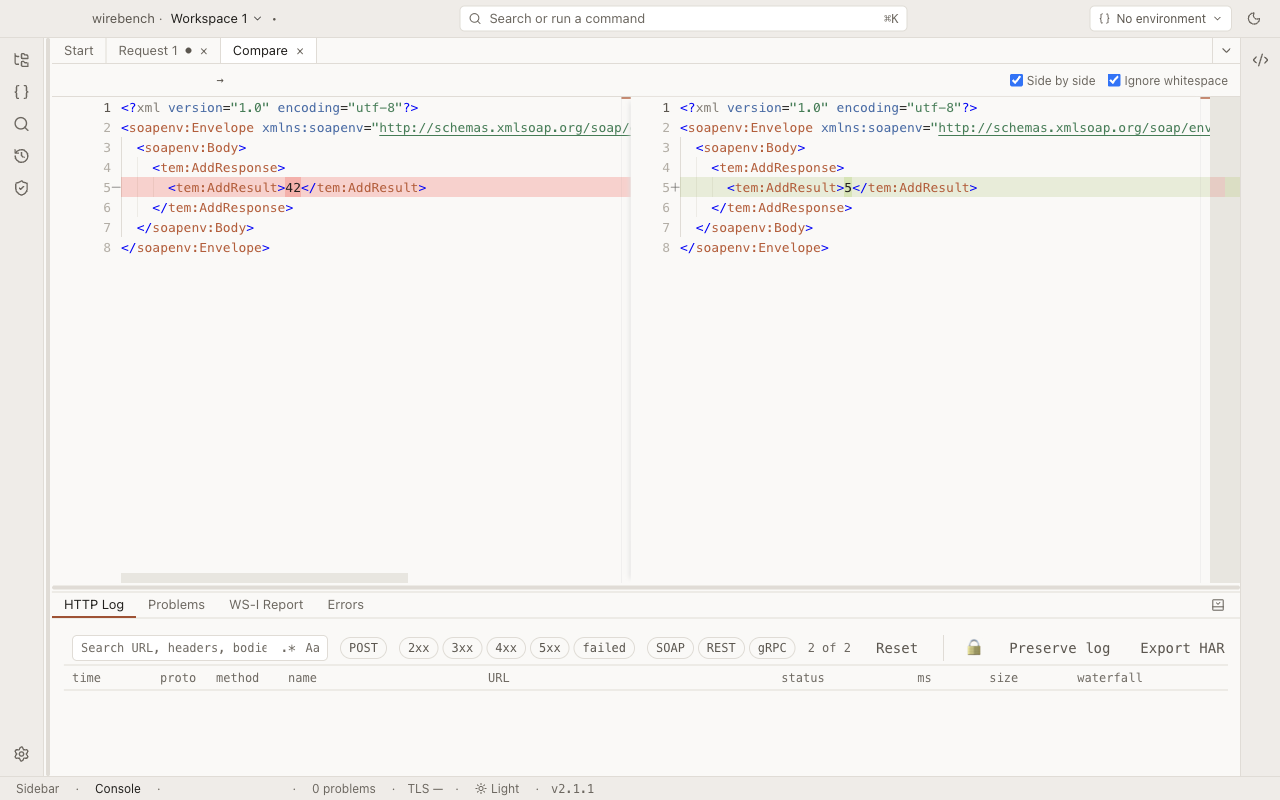
A body that doesn’t parse as JSON or XML is shown as it was recorded, unformatted.
Go to the request
Section titled “Go to the request”An open History entry shows a Go to request button when the request it came from still exists in the project. It opens that request’s own editor tab in the right protocol — REST, gRPC or SOAP.
Delete entries
Section titled “Delete entries”Choose Delete all in the History toolbar, then Confirm, to clear every entry. There’s no per-row delete — only a full clear.
Limits
Section titled “Limits”- A REST request whose response was an event stream (see REST) is recorded with its events, capped at both ends; it can’t be re-sent from History.
- History is per-workspace and stored on disk, so it survives closing and reopening Wirebench.
- History doesn’t keep timings or connection details; that detail lives in the HTTP Log for the session it happened in.
- Compare and Compare with current diff the response and the request, headers included, when both sides are REST. Any other pair diffs the response body only (falling back to the request body when there’s no response, such as after a failed send).
Related
Section titled “Related”- HTTP Log: the raw wire exchange for the current session, with filters and timing detail.
- SOAP and WSDL
- REST
- gRPC